Wireless Reverse Charging
- 3.9
- Rating
- 50.00K
- Installs
- Free
- Price
 Analysis by App-foxy
Wireless Reverse Charging is the kind of Android utility that sounds more effortless than it usually feels in daily use. The idea is simple: let one phone share power with another through wireless charging. In practice, the result depends on the hardware inside both devices, their alignment, battery conditions, and whether the receiving phone supports the right charging standard. I spent time looking at the app from that practical angle, because the important question is not only what the name promises, but whether it helps you get a useful charge when you actually need one.
Developed by Boss Inc, this free app sits in the Libraries & Demo section rather than presenting itself as a full battery-management suite. It is suitable for Everyone, works with Android 7.0 or later, and is currently at version 2.0. Its store summary describes exchanging power between phones, while the shorter description reduces the idea to “Wireless Charging.” That wording is brief, so the real value for a potential user comes from understanding the limits of reverse wireless charging before relying on it.
My overall impression is that Wireless Reverse Charging can be useful as a convenient starting point for compatible phones, but it should not be treated as a magic switch that turns every Android device into a wireless power bank. The most important check is hardware compatibility, not the app icon. If your phone lacks reverse wireless charging support, software alone cannot create the required charging coil or power-control circuitry.
You May Also Like

 Blood Strike: 2.5 Anniversary
Blood Strike’s Loadouts Turn Every Drop Into a Tactical Gamble
A close look at Blood Strike’s custom loadouts: how fast access to signature weapons reshapes its battle royale rhythm, rewards preparation, and narrows the gap between fights.

 Pandora - Music & Podcasts
Pandora’s Music Is Easy to Start, but Harder to Recover
Pandora’s strength is its low-effort path from a seed to a station. Its weak spot is how much confidence it asks you to place in connection, setup, and quiet recovery.

 8 Ball Pool
 Is Built on Rivalries, Rematches, and Routine
A close look at the rivalries, rematches, shared routines, and unanswered safety questions that turn a quick pool match into a persistent mobile community.

 Samsung Music
’s Quiet Strength Is Playing What You Already Own
Its reach comes less from spectacle than from dependable access to a personal library. That simplicity is both the app’s strongest retention engine and its ceiling.

 AccuWeather: Weather Radar
AccuWeather Review: A Quick, Clear Forecast for Everyday Decisions
For everyday plans, the best forecast is the one you can understand quickly. AccuWeather makes rain timing, radar, and local conditions easy to act on, with a few trade-offs.

 Hill Climb Racing
Why Hill Climb Racing Still Turns Crashes Into One More Run
A tiny car, a bumpy hill and one more upgrade: Hill Climb Racing keeps resurfacing because its simple chaos makes every near-miss feel personal.
More From Our News Desk
View All News


Where the experience usually gets stuck
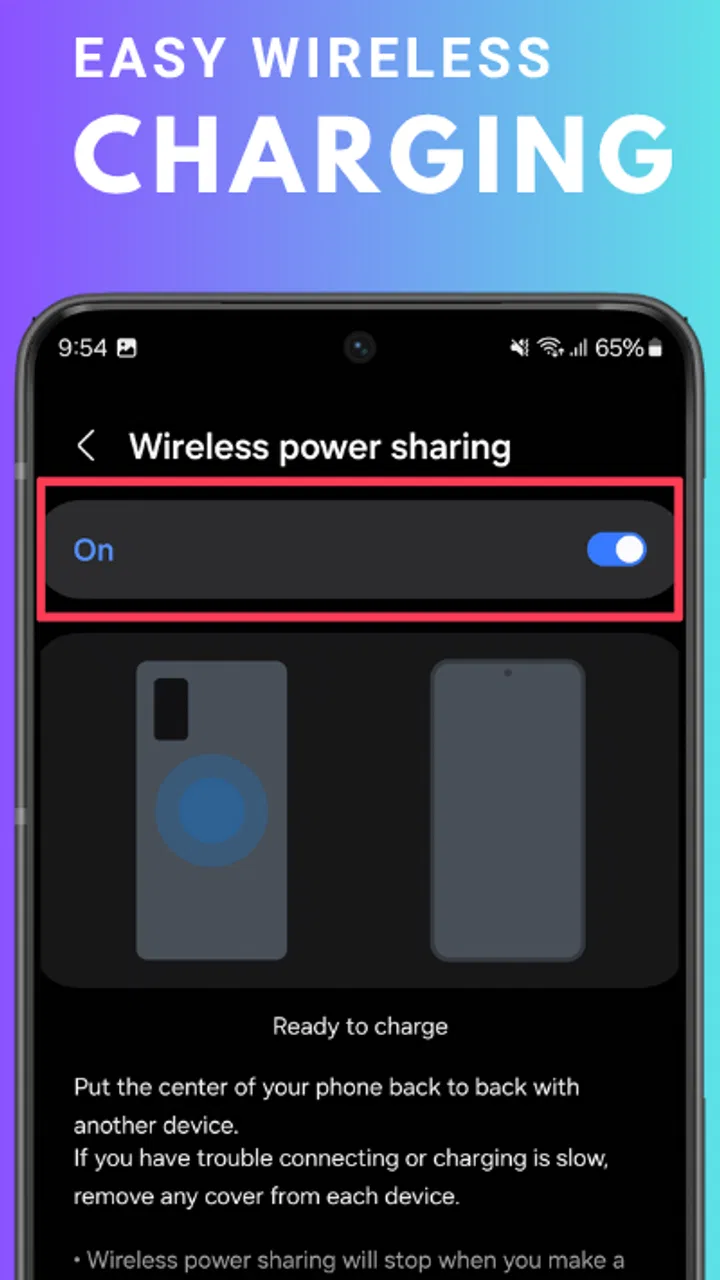
The first point of confusion is the difference between an app that exposes or demonstrates a charging function and a phone that physically supports it. Wireless power transfer is handled by hardware and system-level controls. An app may help you reach the relevant function or explain the process, but it cannot replace a missing transmitter coil. This is why two phones running similar Android versions can behave completely differently.
Before blaming the application, I would check the exact phone model and its official specifications. Look specifically for terms such as reverse wireless charging, wireless power sharing, or battery sharing. The wording varies by manufacturer, so searching only for “wireless charging” is not enough. A phone may be able to receive power wirelessly while lacking the ability to send it back out.
The second common obstacle is the receiving device. It needs to support ordinary wireless charging, and the charging area must be positioned correctly against the transmitting phone. A case, camera bump, metal plate, magnetic accessory, or wallet-style cover can create enough distance or interference to stop the connection. Removing the case temporarily is one of the fastest ways to separate an alignment problem from an app problem.
There is also a practical battery trade-off. Reverse charging uses the donor phone’s battery, so the donor loses energy while the other device gains it. The transfer is not a perfect one-to-one exchange. Some energy is lost during wireless transmission, and the donor phone may stop or refuse to start if its battery is too low or if the system considers the process unsafe. That behavior is frustrating only if you expect the app to override the phone’s own protections.
Another source of confusion is assuming that a brief vibration, sound, or charging symbol proves that the process is stable. Wireless charging can begin and then stop when the phones shift by a small amount. A desk may seem flat, yet a raised camera module can leave the charging coils slightly separated. I found that a stable surface and careful placement matter more than repeatedly tapping the app.
What to check before opening the app
I recommend starting with the simplest physical arrangement. Place the phone that will provide power face down if its design requires that position, then place the receiving phone over the central rear area rather than lining up the screens or camera corners. Move the second phone slowly until its charging indicator appears. Once it does, avoid touching either device for a moment and watch whether the indicator remains active.
Remove thick cases from both phones during the first test. This is especially important when one case contains cards, a metal ring, a kickstand, or a magnetic insert. Those accessories are convenient for everyday use but can interfere with wireless energy transfer. If charging works without the case, you have found a practical workaround rather than a reason to uninstall the app.
Keep both devices awake while testing, if possible, and make sure neither is already connected to a cable or unusual charging accessory. A phone may prioritize a wired connection or apply its own charging rules. I would also close demanding activities such as games or long video sessions on the donor phone, because heat and heavy power use reduce the usefulness of sharing energy.
Do not expect a fast emergency refill. Reverse wireless charging is best understood as a short-term rescue method for a small top-up, not as a replacement for a wall charger. If you need to restore a large amount of battery quickly, a cable and a compatible adapter will normally be the more dependable choice. The app makes sense when convenience matters more than speed.
It is worth checking the Android version requirement too. Wireless Reverse Charging supports Android 7.0 and newer, but that does not mean every device on those versions includes the necessary wireless hardware. The operating-system requirement tells you whether the software can be installed; it does not guarantee that your particular phone can transmit power.
A sensible setup routine
Confirm that the donor phone supports reverse wireless charging and that the receiving phone supports wireless charging.
Remove cases and accessories that add thickness or contain metal.
Give both phones enough physical stability to remain aligned.
Open Wireless Reverse Charging and follow the available on-screen direction rather than repeatedly moving the phones at random.
Place the receiving phone over the donor’s central charging area and wait for a stable charging indication.
Check the phones after a short interval for movement or unusual warmth.
This sequence is more useful than treating the app as a one-tap solution. It also helps identify the real failure point. If the compatible hardware works without a case but not with it, the accessory is the issue. If neither arrangement works, the next step is to check the phone’s own battery-sharing setting or manufacturer instructions rather than assuming the app has failed.
Recovering from an interrupted charging session
When the connection drops, I would not immediately uninstall and reinstall the app. First separate the phones, wait briefly, and start again from a clean position. Wireless charging can stop because the devices shifted, the donor became warm, the receiving battery reached a system limit, or the operating system paused the function. Restarting the physical setup often tells you more than restarting the software.
If the app appears to respond but no charging symbol remains on the receiving phone, test the receiver on a known compatible wireless charger if one is available. This is a valuable diagnostic step because it checks whether the receiver’s coil and charging system are working at all. If it also fails there, Wireless Reverse Charging is unlikely to be the root cause.
If the receiving phone charges normally from another wireless source but not from the donor phone, inspect alignment and donor compatibility. Place the devices on a hard, level surface and remove anything between them. A soft sofa or bed can allow the phones to slide apart without making the movement obvious. For an emergency transfer, a table is much better than a lap.
Battery level is another practical factor. A donor phone near its own low-battery threshold may refuse to share power, even if it worked earlier in the day. That is sensible behavior: giving away the last part of the donor’s charge could leave both people without a usable phone. If the donor is already struggling, a cable, power bank, or wall outlet is the safer recovery option.
Heat deserves attention during any repeated attempt. Wireless transfer creates warmth, and a phone already exposed to sunlight, navigation, gaming, or video recording may pause charging to protect itself. Move the devices to a cooler indoor surface, stop demanding apps, and allow them to settle. I would avoid covering the pair with clothing or placing them under a pillow, because that traps heat and makes the setup less safe.
One less obvious trade-off is that the donor phone may continue consuming power for its own background work while it is trying to help another device. If you are sharing power during travel, reduce unnecessary screen use and pause downloads on the donor. This will not turn the process into a fast charger, but it can make the emergency top-up more worthwhile.
When the app is not the cause
Some failures are controlled by the phone manufacturer’s software. A device may hide reverse charging inside a system panel, disable it below a certain battery level, or stop it when temperature rises. Those rules can change after a system update or differ between models from the same brand. Wireless Reverse Charging cannot reliably override them, so the phone’s own battery and connection settings remain part of the troubleshooting process.
Another possibility is that the donor phone supports only a manufacturer-specific sharing mode. In that situation, the app may be useful as a guide or access point, but the actual transfer still depends on the built-in feature. If the phone’s settings contain a battery-sharing control, compare the app’s instructions with that system option and use the system control when it is available.
Bluetooth and mobile data are not substitutes for wireless power transfer. Turning them on or off will not create a charging connection. Likewise, placing two phones back-to-back does not guarantee that either one will detect the other. The relevant coils must be present, enabled, and aligned. This is a good example of why the name can create expectations that the hardware ultimately decides.
For someone who needs dependable charging every day, I would choose a cable or a dedicated power bank instead. Those alternatives are less sensitive to alignment, cases, movement, and phone orientation. Wireless Reverse Charging is more attractive for occasional situations: a friend needs enough power to make a call, a second phone needs a small boost before using navigation, or you want to avoid carrying another accessory for a brief emergency.
The app’s audience size suggests that it has found interest among Android users, with an average rating of 4.1 from around 500 ratings and over 10 thousand installs. I see those figures as a sign that the concept is useful to a meaningful group, but not as proof that it will work on every phone. The experience is fundamentally tied to device compatibility, so your model’s specifications matter more than the overall rating.
Because it is free and rated for Everyone, trying it carries little commitment for a curious compatible-device owner. Still, “free” does not remove the time cost of testing cases, alignment, battery levels, and system settings. If your phone has no reverse wireless charging hardware, the better decision is to stop after checking the specifications rather than spending time repeating the same failed setup.
Who should use it and who should skip it
I would recommend Wireless Reverse Charging to someone with a phone that explicitly supports wireless power sharing and who wants an occasional backup method. It is particularly practical for people carrying two compatible phones, couples or friends traveling together, and anyone who values leaving a cable at home for short trips. The strongest use case is not a complete recharge; it is gaining enough battery to finish a journey, contact someone, or reach a charger.
I would skip it if your main phone charges only through a cable, if your case cannot be removed easily, or if you need predictable charging while walking or commuting. I would also avoid relying on it for a long workday. The donor phone becomes part of the charging equipment, and both devices need to remain together and correctly positioned. That is a poor fit for pockets, bags, and active movement.
My practical test is simple: verify the hardware, remove the case, try a stable surface, and observe whether the connection remains active. If those conditions work, the app has a place in your emergency toolkit. If they do not, a short cable is likely to solve the problem more consistently and with less attention.
Wireless Reverse Charging is a focused utility rather than a complete answer to battery anxiety. Boss Inc has made a free Android app for a useful but hardware-dependent task, and the current version 2.0 is worth considering when your phone already has the required capability. I like the convenience in the right situation, especially for a small emergency boost, but I would not promise it as a universal charger.
My final advice is to treat it as a helper, not a guarantee. Check compatibility before downloading, test without accessories, keep the phones aligned on a cool stable surface, and have a cable available when the charge really matters. With those expectations, Wireless Reverse Charging can be a handy addition for compatible Android phones; without them, the usual wired alternative remains the more reliable choice.
FAQs for Wireless Reverse Charging
01What is Wireless Reverse Charging and how does it work?
Wireless Reverse Charging is a feature that allows your smartphone to act as a power source for other devices. Using Qi wireless technology, it transfers power from your phone to another device, such as earbuds or another phone, by placing them back-to-back. It’s a convenient way to share power on the go.
02Which devices are compatible with Wireless Reverse Charging?
Most devices compatible with Qi wireless charging can utilize Wireless Reverse Charging. This typically includes smartphones, smartwatches, and wireless earbuds. However, it’s essential to check if your device supports reverse charging and has the necessary hardware to function properly.
03How does Wireless Reverse Charging affect my phone's battery life?
Wireless Reverse Charging can deplete your phone's battery more quickly as it shares its power with another device. It’s recommended to use this feature when your phone has a sufficient charge and not as a regular charging method. Frequent use might also generate heat, which could impact battery health over time.
04Is Wireless Reverse Charging safe to use?
Yes, Wireless Reverse Charging is generally safe, as it uses low power transfer rates and includes safety features to prevent overheating and overcharging. However, ensuring that both devices are aligned correctly and kept in a cool environment can help maintain efficiency and safety.
05What are the limitations of Wireless Reverse Charging?
Wireless Reverse Charging is slower than wired charging and might not be suitable for rapidly charging devices. Additionally, not all devices support this feature, and it requires close proximity between devices for effective power transfer. It's a handy feature for emergencies rather than a primary charging method.
Pros
- Convenient for charging on the go.
- No need for cables or chargers.
- Supports multiple device brands.
- Energy-efficient charging process.
- User-friendly interface.
Cons
- Limited to compatible devices.
- May drain battery quickly.
- Slower charge than wired options.
- Requires close device proximity.
- Not suitable for all phone models.

Wireless Reverse Charging
Gallery